Mpix is a well-known high-end photo printing service that promises the fastest mail-in shipping times and offers specialties like giclee prints. Its prices are higher than some competing photo printing services, but its website interface, printing options and shipping packaging are excellent. Professional photographers will appreciate that it’s one of the few major photo printing services that still develops film. However, Nations Photo Lab comes out on top thanks to its slightly better image quality, sturdier shipping packaging and more image format support, making Nations our Editors’ Choice winner. As for bargain prices, Walmart is our Editors’ Choice winner, and for local pickup within an hour, it’s Walgreens Photo.
How much does Mpix cost?
For 4-by-6-inch prints, you’ll pay 36 cents per photo at Mpix, with no volume discount unless you print more than 10 of the same shot, in which case the price drops to 27 cents per print. Nations Photo Lab also charges 36 cents per print, and Printique charges 32 cents. Snapfish is the cheapest option for this size at 9 cents. Walmart Photo is the next cheapest choice at 14 cents, while Amazon Photos charges 17 cents.
Larger sizes are also at the higher end of the price scale, but Mpix isn’t the most expensive here: 5×7-inch for $1.69 and 8×10-inch for $3.29. For comparison, Amazon Prints charges just 69 cents and $2.09, and Walmart Photo charges $1.09 and $2.94. More direct high-end competitors Printique and Nations Photo Lab charge $2.65 and $3, respectively, for 8×10-inch prints.
The standard E-Surface paper option suggested by the service has a slightly marbled, matte texture. If you want glossy prints, you’ll pay 44 cents per 4×6, $2.04 for 5×7, and $3.73 for 8×10. These use giclee paper, and the finish produces “a wider color palette, smooth gradations, and detailed, vibrant color reproduction,” according to Mpix. I ordered both E-Surface and giclee for testing.
Mpix requires you to set up an account before you can start ordering, which is actually good because having an account helps you keep track of your orders later. Surprisingly, this isn’t a common practice among photo printing services.
Mpix Photo Gifts and Cards
Mpix offers a good selection of items that can be decorated with your photos. You can get cards, calendars, and photo books, as well as bag tags, personalized baseball cards (make Junior feel like an MLB star), blankets, Christmas ornaments, and keychains. One of the more interesting options is the cut-out statuette, which starts at $16.
Mpix offers more than 400 holiday photo card designs, as well as premium features like decorative shapes and foil printing. If you want folded cards, you’ll have to create your own layout design. Cards range in price from 89 cents each for a single flat image to $3.90 each for multi-photo foil cards, with discounts for larger quantities.
Uploading and ordering photos on Mpix
Mpix has a clear, well-designed website. The service lets you upload photos from your computer, and you can also pull photos from your Google Photos account. Mpix stores your uploaded photos in folders for later use. One limitation is that the website only lets you upload JPGs or PNGs—no HEIC/HEIF or TIFFs, although you can upload HEIC/HEIF files on the mobile app. However, it was one of the few services that didn’t reject a 108-megapixel shot from a Samsung Galaxy S21 Ultra smartphone because of its size. (Nations Photo Lab accepted it too.) The upload interface supports drag-and-drop from computer folders.
After you upload photos, you’ll see a filmstrip view with thumbnails at the top, and each image will be displayed large in the center, with all the size options in a column on the left. Cropping, zooming, rotating, text overlay, and effects like black and white are available. You can also choose a paper type (standard, metallic, or black and white), gloss or linen texture, and matting/mounting.
After uploading photos, you will see a filmstrip view with thumbnails at the top and each image will be displayed large in the center, with all size options in a column on the left. Cropping, zooming, rotating, text overlay and effects such as black and white are available. You can also choose a paper type (standard, metallic or black and white), gloss or linen texture and matting/mounting.
After selecting all print sizes and quantities, you will have more options to make changes to your order on the next page. Here you will see a clear order summary with all products and quantities you can choose. You can also change the print quality to giclée, glossy, semi-gloss or fine art matte.
On the last page before completing the order, you can see the final image preview or add photo retouching services of various kinds: facial retouching, glass flare removal, stray hair removal, red eye reduction, braces removal and teeth whitening. Professional retouching isn’t offered by your run-of-the-mill photo printer, and most charge $8 per service for a head.
If desktop computers aren’t your thing, Mpix has a mobile app called Tap to Print that lets you order from your phone using images on your phone. You get the same features as the website, including cropping and mounting options.
Shipping options galore
Shipping costs are similar to other services. For orders over $35, standard shipping is free on Mpix. For my order of 23 prints, economy shipping was $4.99 with a 14-21 day delivery window. Economy Plus is $6.99 and includes tracking with a 7-14 day time frame. For $9.99, standard gets you the shots in 3-7 days. The $19.99 Express option has a 1-3 day shipping window, and the Express option with signature required ($21.99) has the same time frame.
Mpix’s faster rates are comparatively cheap. For example, Shutterfly charges $58.91 for guaranteed 7-day delivery of the same order.
You can add “boutique packaging” for $10. One free option is “white label” packaging for clients or gifts, which removes any mention of Mpix or pricing. Another is custom text printing on the back of your photos. By default, the photo file names are printed on the back of the images, but this lets you print the same message on the back of each image in the order.
Mpix Packaging and Print Quality
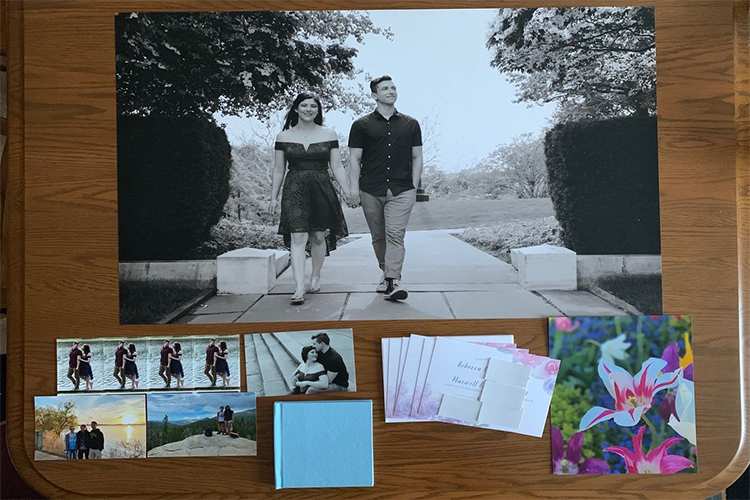
Just five days after I placed the order, Mpix shipped our test prints in a cardboard envelope with clear plastic sleeves stiffened by cardboard sheets inside for each set of photos. The company didn’t use cardboard, as Nations Photo Lab and Printique did for the same order. An enclosed invoice clearly states the contents. Below are the shipping box comparisons, with Mpix second from the top right:
Mpix’s print quality is very good. Our 4×6 test prints were printed on Fuji Professional paper, while the 8×10 prints used paper without an identifying watermark. Nations Photo Lab, on the other hand, uses the highly rated and durable Kodak Endura paper. Mpix’s standard E-Surface paper option suggested by the service has a slightly marbled, matte texture. That’s fine for most uses, but it can detract from the fine details we see on the glossy prints we use for testing. Most services offer an entry-level glossy option, but Mpix charges more for its two glossy options.
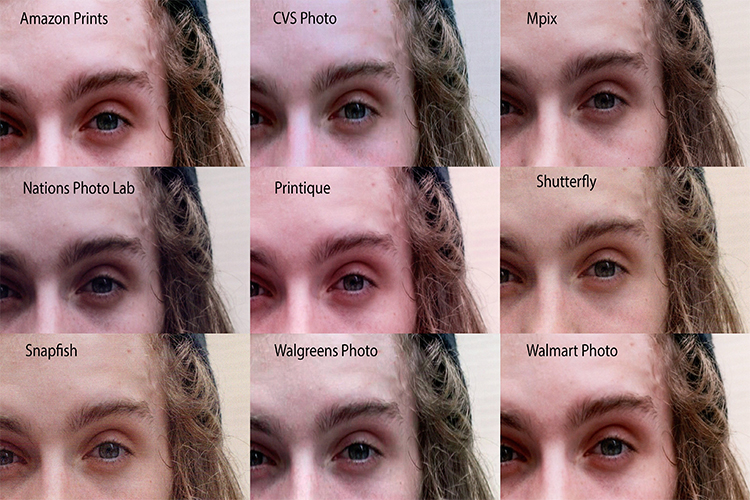
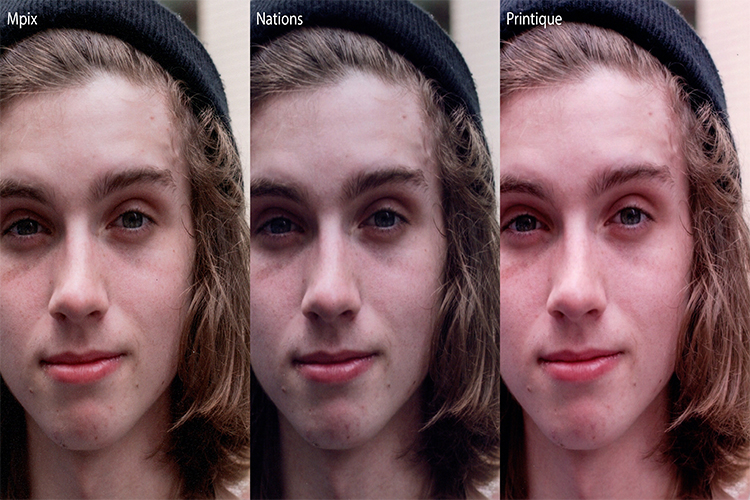
Comparing a portrait taken in 4×6 prints from the three high-end professional services it competes against, the Mpix print has both more natural colors and more sharpness than Printique and Nations. Here are scans of the prints of the same image from the services tested. (The Mpix print is on textured e-paper, which uses Fujicolor Professional paper.)
Mpix performed well, if not class-leading, in a cityscape test, as you can see below. Its level of detail is better than Printique, another premium service, but the Nations Photo Lab print beats it with better detail and color saturation.
Photo Sharing with Mpix
Although Mpix isn’t an online photo-sharing service like Flickr, you can have the service create an email invitation to let others view your online-hosted photo galleries. A side benefit is that you can offer recipients the option to purchase your photos, though you won’t receive a commission, like with SmugMug and 500px. The recipient can view the images as gallery thumbnails or as a well-presented slideshow with large images.
A premium but expensive choice for printing photos
We were impressed from the start with Mpix’s order pages, which are clear and full of options. The price is the highest among the mail-order providers we tested, but it’s within the expected range for a premium service. The shipping packaging isn’t as protective as other top services, but the photo print quality is very good. Still, Nations Photo Lab comes out on top as our Editors’ Choice winner thanks to its more accurate colors, sturdier packaging, and premium paper. If spending as little as possible is more important to you, Walmart Photo is our Editors’ Choice for price, and if you need prints for same-day pickup, Walgreens Photo is our Editors’ Choice.
Add a Comment